Accounting
You Can Talk To

Beyle Lekka is AI-assisted accounting software for Indian businesses. Keep sales, purchases, expenses and payments in one place.

Describe a transaction, upload a bill or enter it manually. Review each draft, then track stock, reconcile the bank and prepare reports with your accountant.

Get it on Microsoft StoreExplore product screens
You confirm AI drafts Manual entry included
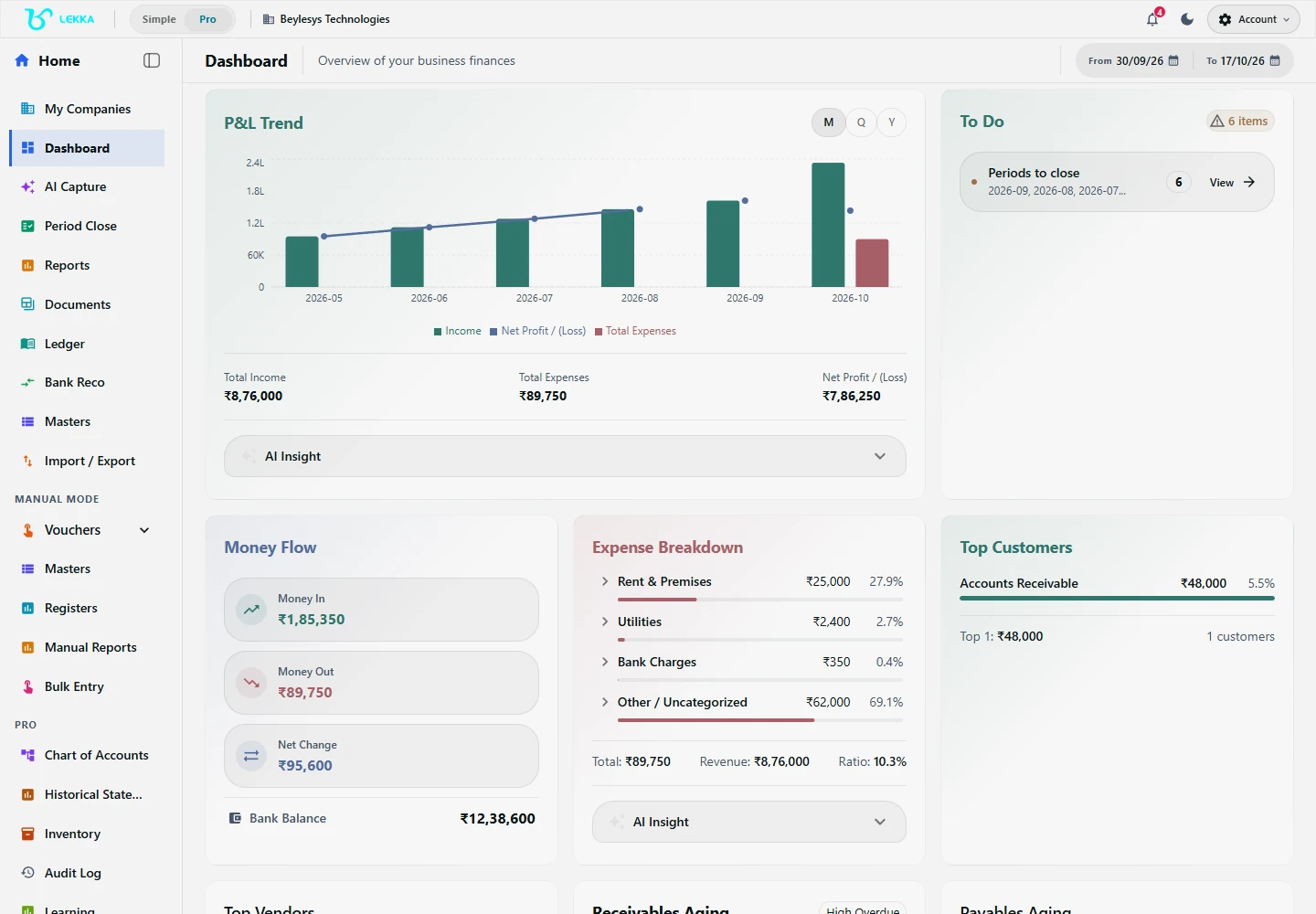
Beyle Lekka dashboard for the Beylesys Technologies test company.

Start from the company dashboard and open the accounting workspace you need.

Beylesys Technologies · local test company · sample records
Open full size
AI captureGST & TDSBank reconciliationInventory & productionCA collaboration

Capture a transaction.
Review your books.

Explore real screens from Beylesys Technologies, our local test company. See where to begin an AI draft, enter a manual payment, review vouchers and reconcile your bank. Each screen links to a guide with the next steps.

Inside Beyle LekkaActual product screens

Begin with what happened.

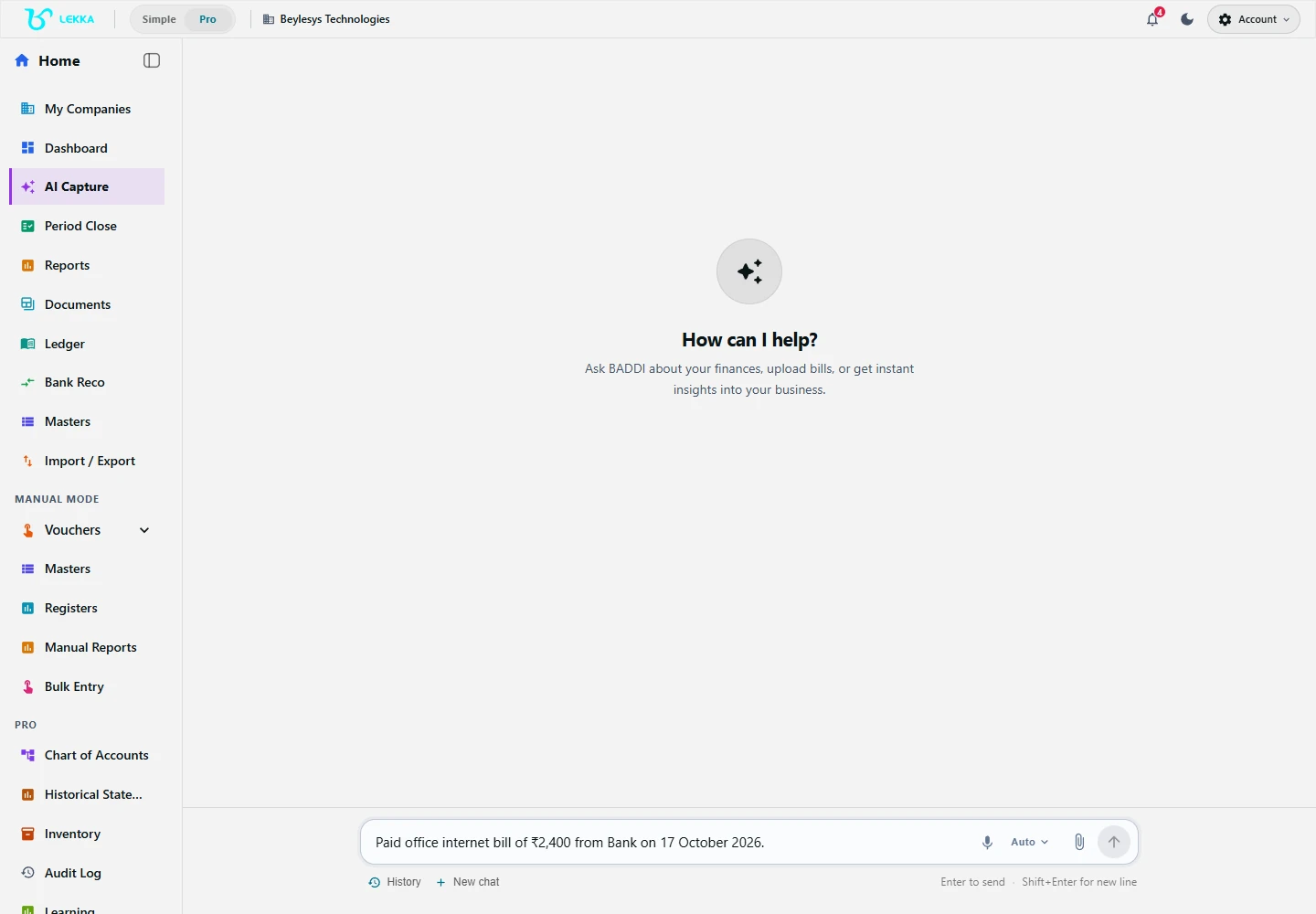
Open Capture in your company. Describe the transaction or upload its document. When a draft is ready, check the date, party, accounts, amount and tax details before you confirm it.

Read the capture guide
Beyle Lekka Capture workspace for describing or uploading a transaction.

Capture is where you describe a transaction or provide a document to begin a draft.

Beylesys Technologies · local test company · sample records
Open full size

Select a screen to explore. These screenshots show a local test company; this website does not create or post transactions.

New to Beyle Lekka? Follow the setup and first-transaction guide →

01

Capture your way

Type, speak, upload a document or enter a manual voucher.

02

Review the details

Check accounts, amounts and tax treatment before confirming.

03

Work from connected records

Review the ledger, reconcile the bank and prepare your reports.

Daily books or year-end reports.
Start with the work you need.

Use Beyle Lekka to maintain your accounts, or bring existing balances into a reporting workspace. Your company type, role and workspace mode determine the tools you see.

Daily accounting for your business.

For owners and accounting teams recording day-to-day activity. Start with your company details and opening balances, then build your books as you work.

  • Record invoices, bills, expenses and payments
  • Track customer dues, supplier balances and stock
  • Match bank transactions and review financial reports
Explore the accounting workflow

Year-end reporting for CA firms.

Keep daily accounting in your existing system and use a compliance workspace for reporting. Import a Trial Balance or supported financial statements, then review the source, mappings and notes.

  • Organise each client in a separate workspace
  • Review Schedule III classifications and unresolved items
  • Finalise statements using the selected reporting source
Explore the reporting workflow

A compliance workspace uses the selected source balances for reporting and keeps the ledger read-only. Simple and Pro are display modes, separate from your subscription plan.

Record the day.
Understand the business.

Keep invoices, payments, stock and accounts connected. See who owes you money, check your books against the bank statement, and give your accountant the records needed for tax and financial reporting.

Explore all features

AI capture & voice

Turn a message, voice entry or uploaded bill into a draft you can review before posting.

  • Text and voice entry
  • Document extraction and clarification
Explore feature

Vouchers & recurring entries

Keep precise control with manual vouchers, bulk entry and recurring templates.

  • Sales, purchase, receipt and payment
  • Journals, contra and credit/debit notes
Explore feature

Bank reconciliation

Import a statement, review suggested matches and investigate the differences.

  • CSV statement import
  • Auto-Match and manual matching
Explore feature

Inventory & manufacturing

Follow goods from receipt to dispatch, and raw materials through production.

  • Warehouses, bins, batches and serials
  • GRNs, challans, transfers and returns
Explore feature

GST & TDS workflows

Prepare tax information and supporting records with your accountant.

  • GSTR-1 and GSTR-3B information
  • ITC, RCM and GST settlement review
Explore feature

Period close & fixed assets

Bring adjustments, depreciation and review checks together before closing a period.

  • Close checklist and adjustment journals
  • Fixed assets and depreciation
Explore feature

Different roles.
The same set of books.

A straightforward view for the owner. Detailed workflows for the accountant. Connected client work for the CA.

Clear books for business owners.

See money coming in, expenses going out and what needs your attention. Capture daily transactions in your own words.

  • AI capture with draft review
  • Customer and supplier balances
  • A shared workspace with your CA
For business owners

Detailed tools for accounting teams.

Move through vouchers, registers and reconciliations with the controls you need to keep the books reliable.

  • Manual, bulk and recurring entry
  • Bank reconciliation and tax review
  • Period close and audit history
For accounting teams

Client workspaces for CA firms.

Bring clients, firm staff and reporting work into an organised practice workspace with explicit assignments.

  • Client workspaces and staff roles
  • Schedule III mapping and notes
  • CA vouching when enabled
For CA firms

Bring your history.
Keep your momentum.

Move from existing records with import previews, account mapping and opening-balance review. Keep supported local work moving on desktop, with sync and recovery controls close at hand.

Plan your migration

A plan for the way
you work.

One business, a growing team or an entire practice. Choose your workspace structure, then review the current price and capacity in Billing.

Basic

For one owner managing one business.

  • One business workspace
  • Owner-operated accounting
  • No additional team members
Get the Windows app

Max

For teams managing several businesses.

  • Separate books for each company
  • Company switching and collaboration
  • Company and team limits as purchased
Get the Windows app

CA Pro

For a firm managing client workspaces.

  • CA organisation and client workspaces
  • Firm staff and client assignments
  • Statutory workflows; vouching when enabled
Get the Windows app

Prices, trial offers, AI budgets and capacity limits are shown in the application. Feature access depends on your plan and setup.

Compare plans and billing

FAQ's

Beyle Lekka is AI-assisted accounting software for Indian businesses and CA firms. Record sales, purchases, expenses and payments by describing them, uploading documents or entering vouchers manually. Review AI drafts before posting, then use your books to track dues and stock, match bank transactions and prepare reports. CAs can also work from imported balances in a compliance workspace.

You can start by describing everyday transactions in your own words. Lekka suggests an accounting entry for you to check. Simple view uses everyday labels; Pro shows more accounting detail. Your accountant can help with setup, classifications, tax decisions and period-end review.

For AI capture, Lekka prepares a draft for you to review and confirm. Check the party, date, accounts, amounts and applicable taxes. Posting validation then checks the entry before it is saved. A balanced entry still needs your review for the correct business and tax treatment.

Yes — two ways. The import wizard takes Tally XML, CSV, Excel and ZIP exports with mapping, diagnostics and a needs-review queue. The Windows desktop app additionally bridges to a running Tally Prime over localhost for ledgers, vouchers, TB/BS/P&L and stock.

Yes. Connect your CA and choose the available access level for your workspace. CA Pro supports client workspaces, staff assignments and reporting workflows. Audit vouching is an optional module and must be enabled.

Use the export options in the relevant report, document or import/export screen. Formats vary by record and workflow, including Excel, CSV, PDF and JSON. Download the records you need before your access ends; check Billing for coverage dates.

Browse all FAQ's →

Your books, ready for Windows.

Get Beyle Lekka from Microsoft Store, sign in and set up your company to start working on your books.

Get it on Microsoft StoreSee pricing