Enter vouchers fast, and still know who changed what.
Your team lives in vouchers, registers and the Day Book — that doesn’t change. What changes is the boring part: bulk and recurring entry do the repetitive work, bank rules pre-match the statement, and every entry shows who made it.
A day in the finance office
- 01
Start with the Day Book
Scan yesterday’s vouchers across every register — what posted, what is draft, what needs a second pair of eyes.
- 02
Bulk-enter the routine
Petty-cash lines and courier charges go in through the bulk grid; recurring vouchers handle rent and salaries on schedule.
- 03
Clear the bank queue
Statement lines arrive pre-matched by rules you set. You handle the two genuinely ambiguous entries; the rest confirm in one batch.
- 04
Investigate one mismatch
A supplier ledger disagrees with their statement by ₹4,300. Drill from the ledger to the vouchers, find the unallocated receipt, fix it with a linked correction.
- 05
Close the period
Run the close checklist: bank difference zero, GST queue empty, no drafts pending. The reviewer locks March.
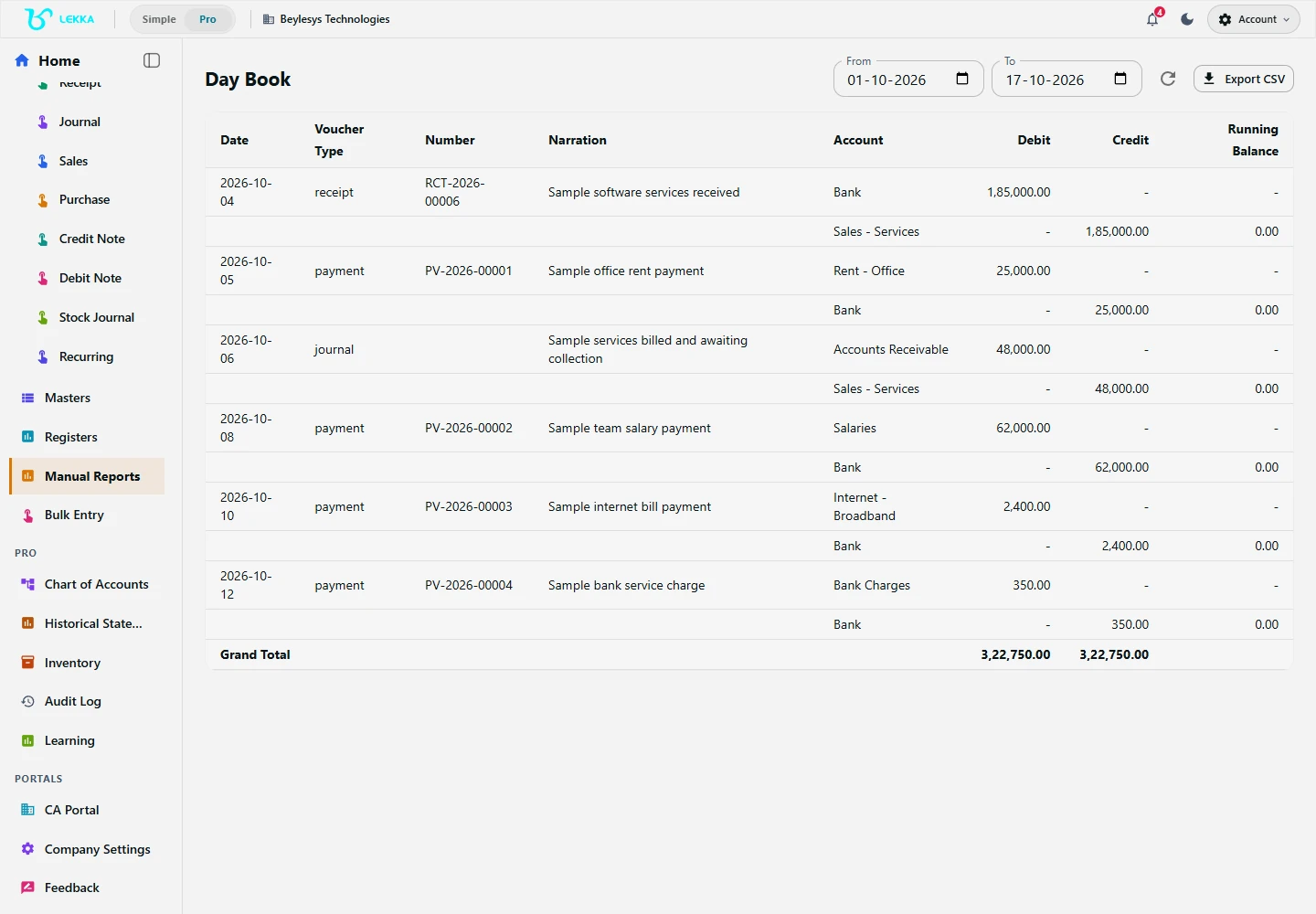
Use the Day Book to review saved vouchers for the selected period.
Beylesys Technologies · local test company · sample recordsLess chasing. More getting things done.
"Entry slows down as volume grows."
Month-end spikes turn into overtime because every voucher is typed one at a time.
Bulk grids, recurring templates and bank rules take care of the repetitive 80% — with a review step before anything posts.
"Corrections hide who did what."
Spreadsheet-era fixes overwrite history, and audit season becomes archaeology.
Corrections are linked follow-up vouchers. Every change is logged with the person who made it.
"Close is a feeling, not a checklist."
Period end runs on memory: did anyone check the bank difference? The GST queue?
The close checklist is explicit — bank, tax, drafts, reviews — and locking a period is a permissioned action with a recorded sign-off.
What the team gets back
Less manual grind, same control.
1 grid
for bulk days — paste, validate, post
80%
of routine bank lines matched by rules before you even look
9 checks
on the close checklist before a period can lock
Corrections
linked reversals for financial changes; before-and-after history for narration edits
Plus supports teams in one business. Max supports teams across several businesses. Review current capacity and prices in Billing.
FAQ's
Roles and delegated permissions control who can enter, review and close. Plus supports a team in one business; Max supports multiple businesses. Check the permissions and review workflow in your workspace.
The close checklist must clear — bank difference, pending tax review, drafts — before a reviewer locks the period. Locked periods reject new entries until deliberately reopened, with the audit trail recording both.
Yes. The audit log records every mutation with user, timestamp and before/after detail.
Fast entry, with the controls kept.
Explore the workflow with your finance team and run one real week — bulk entry, bank rules and a period close included.