Open: Manual Mode → Receipt or Payment
Before you begin
Have the actual bank or cash movement, party, amount, date and invoice references. Check whether bank reconciliation already created the voucher.
Practise in a test company first. Check the active company and your permissions. Available options depend on your plan, role and platform.
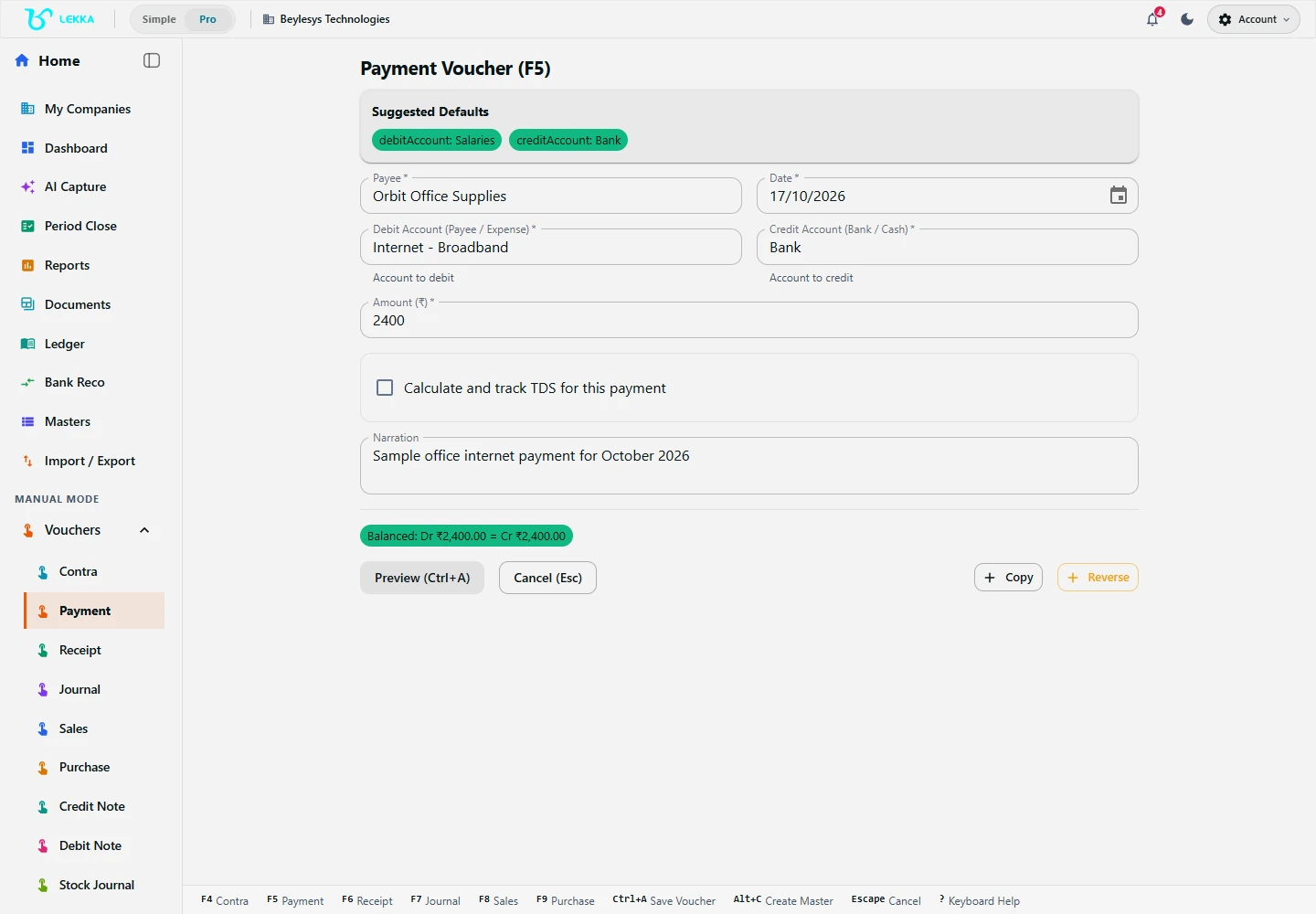
Manual entry gives you a structured voucher form. Check the accounts, date and amount before saving.
Beylesys Technologies · local test company · sample records- 01
Open Manual Mode. Choose Receipt for money received or Payment for money paid.
- 02
Enter the date and select the receiving or paying cash/bank account. Select the customer, supplier or other relevant account.
- 03
Enter the amount and payment reference. If it is an advance, keep that purpose clear in the narration.
- 04
Open the allocation control where offered. Select the invoices or bills being settled and enter each allocated amount; check the allocation total against the actual receipt or payment.
- 05
Review the preview and complete confirmation. This records money that moved; it does not initiate a bank transfer.
- 06
Check Ledger and the party account statement. Confirm the bank movement and remaining invoice balance, especially for a partial settlement.
Check your result
The receipt or payment appears once, in the right account.
If something doesn’t look right
A voucher records the movement; it does not transfer money. Check for an existing bank-generated voucher first.
Contact support →