Open: Period Close → checklist → closing actions
Before you begin
Complete routine entries and bank review for the period. Closing and locking require appropriate permissions; identify the responsible reviewer first.
Practise in a test company first. Check the active company and your permissions. Available options depend on your plan, role and platform.
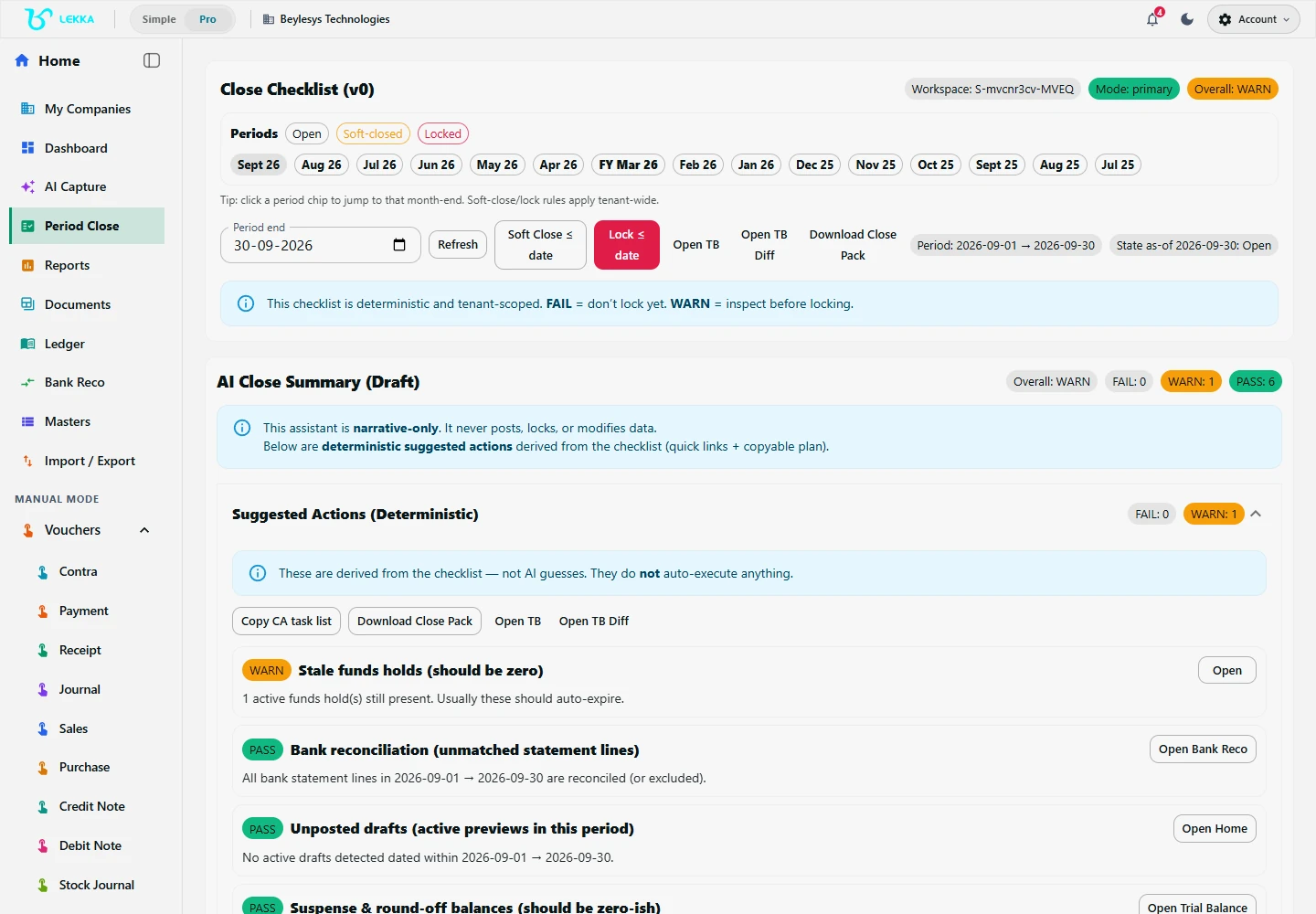
Review period controls as part of your accountant-led closing workflow.
Beylesys Technologies · local test company · sample records- 01
Open Period Close for the intended company and period. Run the checklist and inspect failed or incomplete items.
- 02
Resolve unposted drafts, unmatched bank transactions and account differences. Review Trial Balance and relevant party or inventory balances.
- 03
Use the available adjustment, depreciation, physical-count or closing-stock tools as needed. Review each preview before posting a closing adjustment.
- 04
Record close notes and unresolved issues with the person responsible for follow-up. Refresh the checklist after changes.
- 05
Review and download the close pack where offered. Confirm that it covers the intended company and dates.
- 06
Use the permitted Soft Close or Lock action only after reading its restrictions and confirmation. Verify the saved period state; use the authorised reopen workflow for later corrections.
Check your result
The review is recorded, and every open item has someone responsible for following up.
If something doesn’t look right
Check your permissions before attempting to reopen a period. Make corrections through the supported workflow.
Contact support →